If you have a website and you want to turn your traffic into revenue Google AdSense is usually the place to go. Google AdSense is the industry standard for a reason. The payouts are consistent. The integration is seamless.
Over the years I have managed Google AdSense across projects and I have seen Google AdSense evolve from a purely manual setup to a sophisticated system. Today there are two ways to get started with Google AdSense. Here is my guide on how to set them up without breaking your sites design.
The First Hurdle: Getting Approved
Before you can display Google AdSense ads Google needs to verify that your site is a high-quality environment for their advertisers. While Google does not provide a checklist my experience with Google AdSense shows that these five things are non-negotiable:
- Substantial Content: You need more than just a handful of posts. Aim for a foundation of original helpful articles.
- Clear Navigation: If a human can’t find their way around your site Googles bot won’t like it either.
- Essential Pages: You must have an About, Contact and Privacy Policy page.
- Originality: Avoid scraped or “spun” content. Google AdSense is very good at detecting low-value text.
- Mobile Readiness: Your site must be responsive. Most Google AdSense ad clicks happen on devices today.
Method 1: Using Auto Ads (The Easiest Way)
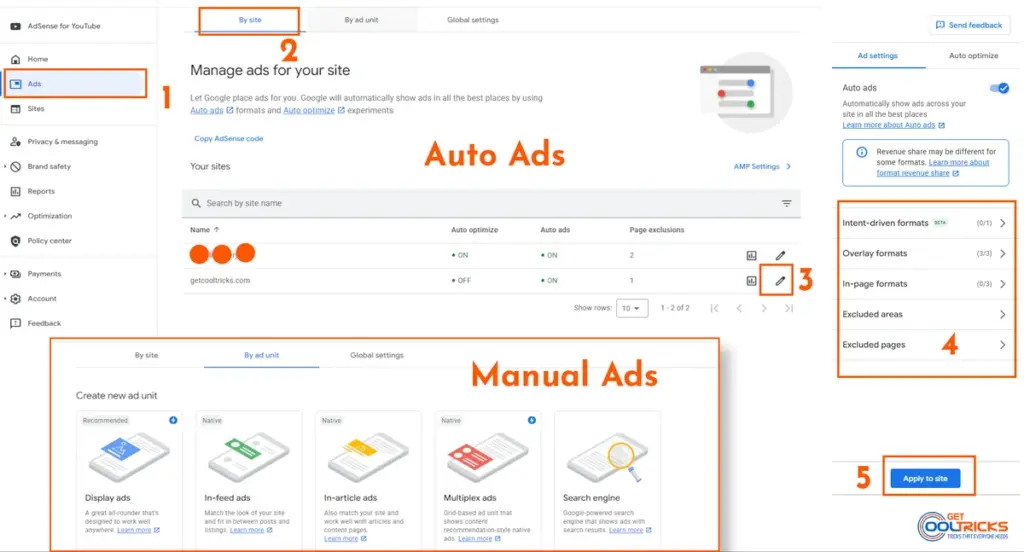
If you want to focus on writing than tweaking layouts Google AdSense Auto Ads is the way to go. Google AdSense scans your site. Uses machine learning to place Google AdSense ads where they are most likely to perform well.
How to Enable Google AdSense Auto Ads:
- Log in to your Google AdSense dashboard.
- Navigate to the Ads section. Click Get Code.
- Copy the script provided by Google AdSense.
- Paste it into the head section of your website.
Which Google AdSense Formats Should You Use?
You don’t have to enable everything. Here is a breakdown of what works with Google AdSense:
- In-page ads: Standard banners within your content.
- Anchor ads: ads that stay at the top or bottom of the screen.
- Vignette ads: Full-screen ads that appear between page loads.
- Side rail ads: Ads that stick to the margins on desktops.
- Multiplex ads: Grid-based ads that look like “Recommended Reading” sections.
My Advice: If you’re unsure start with In-page and Anchor Google AdSense ads. They are the least intrusive but still highly effective with Google AdSense.
Method 2: Manual Ad Units (For Total Control)
If you are a bit of a perfectionist and don’t like Google’s AI deciding where your Google AdSense ads go manual placement is for you with Google AdSense. This allows you to place Google AdSense ads where you know your audience will see them.
Creating a Google AdSense Ad Unit:
- Go to Ads → By ad unit in Google AdSense.
- Select a type (I recommend Display Ads for starters with Google AdSense).
- Give it a name (“Post-Top-Responsive“).
- Copy the generated code from Google AdSense.
Where Should You Place Google AdSense Ads?
To maximize revenue without ruining the user experience with Google AdSense try these placements:
- After the second paragraph: This catches the readers eye immediately.
- After a heading: Readers often pause here making it a natural spot for a Google AdSense ad.
- The Sidebar: Good for desktop users but usually has a click-through rate with Google AdSense.
- End of Post: Perfect for Multiplex Google AdSense ads to keep the user engaged after they finish reading.
How to Add the Google AdSense Code Safely
Whether you use Google AdSense Auto Ads or Manual units you’ll receive a script that looks like this
HTML
<script async src="https://pagead2.googlesyndication.com/pagead/js/adsbygoogle.js?client=ca-pub-XXXXXXXXXXXX" crossorigin="anonymous"></script>For WordPress Users:
Don’t just paste this into your header.php file. If you update your theme you’ll lose the Google AdSense code. Instead use a “Header & Footer” plugin or yet add it to your Custom Functions Plugin using this snippet:
add_action('wp_head', 'gct_add_adsense');
function gct_add_adsense() {
    ?>
    <script async src="https://pagead2.googlesyndication.com/pagead/js/adsbygoogle.js?client=ca-pub-XXXXXXXXXXXX" crossorigin="anonymous"></script>
    <?php
}
Final Thoughts
Google AdSense has become much more user-friendly over the years. My recommendation for people is to start with Google AdSense Auto Ads to see where the “hotspots” on your site are. Once you have some data you can switch to placements for more control with Google AdSense.
Remember: Content is king. Google AdSense ads only work if people are actually staying on your site to read what you’ve written. Focus on quality. The revenue will follow with Google AdSense.