Permalinks define how your website URLs are structured. By default, WordPress uses a plain URL format that is not user-friendly or SEO-friendly.
In this guide, you’ll learn how to change the permalink structure in WordPress and choose the best format for your website.
What Are Permalinks?
Permalinks are the permanent URLs used to access your:
- Blog posts
- Pages
- Categories
- Tags
- Archives
For example:
- Default URL:
https://example.com/?p=123 - SEO-friendly URL:
https://example.com/post-name/
A good permalink structure makes your URLs:
- Easy to read
- SEO-friendly
- Meaningful to users
Why Change the Permalink Structure?
The default WordPress permalink structure is not ideal for SEO.
Changing it helps:
- Improve search engine visibility
- Make URLs more readable
- Increase click-through rates
- Better organize your content
For most websites, using a clean structure like:
/post-name/is recommended.
Important Before You Change Permalinks
Changing permalinks on an existing website can affect SEO.
- Old URLs may break
- Search engines may need to reindex pages
- You may need to set up 301 redirects
If you are setting up a new site, change the permalink structure before publishing content.
If you are unsure, test changes on a local setup first. You can follow our guide on installing WordPress on WampServer to safely experiment.
How to Change the Permalink Structure
Follow these steps:
- Log in to your WordPress Dashboard
- Go to Settings → Permalinks
- Choose a structure under Common Settings
Recommended Option
Select:
Post name
This creates clean URLs like:
https://example.com/post-name/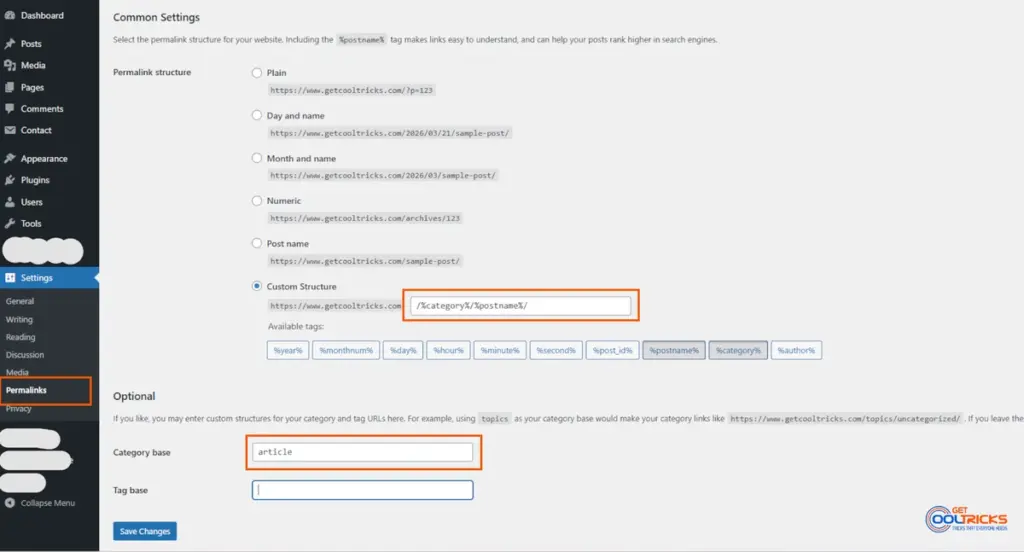
Using a Custom Permalink Structure
WordPress also allows you to create custom URL structures using tags.
Go to Custom Structure and use tags such as:
%postname%

%category%

%year%

%monthnum%

%post_id%

%author%
Example:
/%category%/%postname%/Example URL:
https://example.com/wordpress/change-permalink-structure/Choose a structure that fits your content strategy and keep it consistent.
Changing Category and Tag Base (Optional)
By default, WordPress adds prefixes like:
/category/

/tag/
Example:
https://example.com/category/windows/You can change this:
- Scroll to Optional section in Permalink settings
- Enter a custom base (e.g.,
articles)
Result:
https://example.com/articles/windows/This step is optional and not required for most websites.
Best Practices for Permalinks
- Keep URLs short and simple
- Avoid unnecessary parameters
- Use keywords naturally
- Do not change structure frequently
- Always use 301 redirects if changing existing URLs
Final Thoughts
Changing the permalink structure is one of the first things you should do after installing WordPress. A clean and consistent URL structure improves both SEO and user experience. If you are setting up a new site, configure permalinks early to avoid issues later.